 iPhone 随身口袋工具箱
Pocket Toolkit for iPhone
iPhone 随身口袋工具箱
Pocket Toolkit for iPhone
WhatKit? 那什么 WhatKit
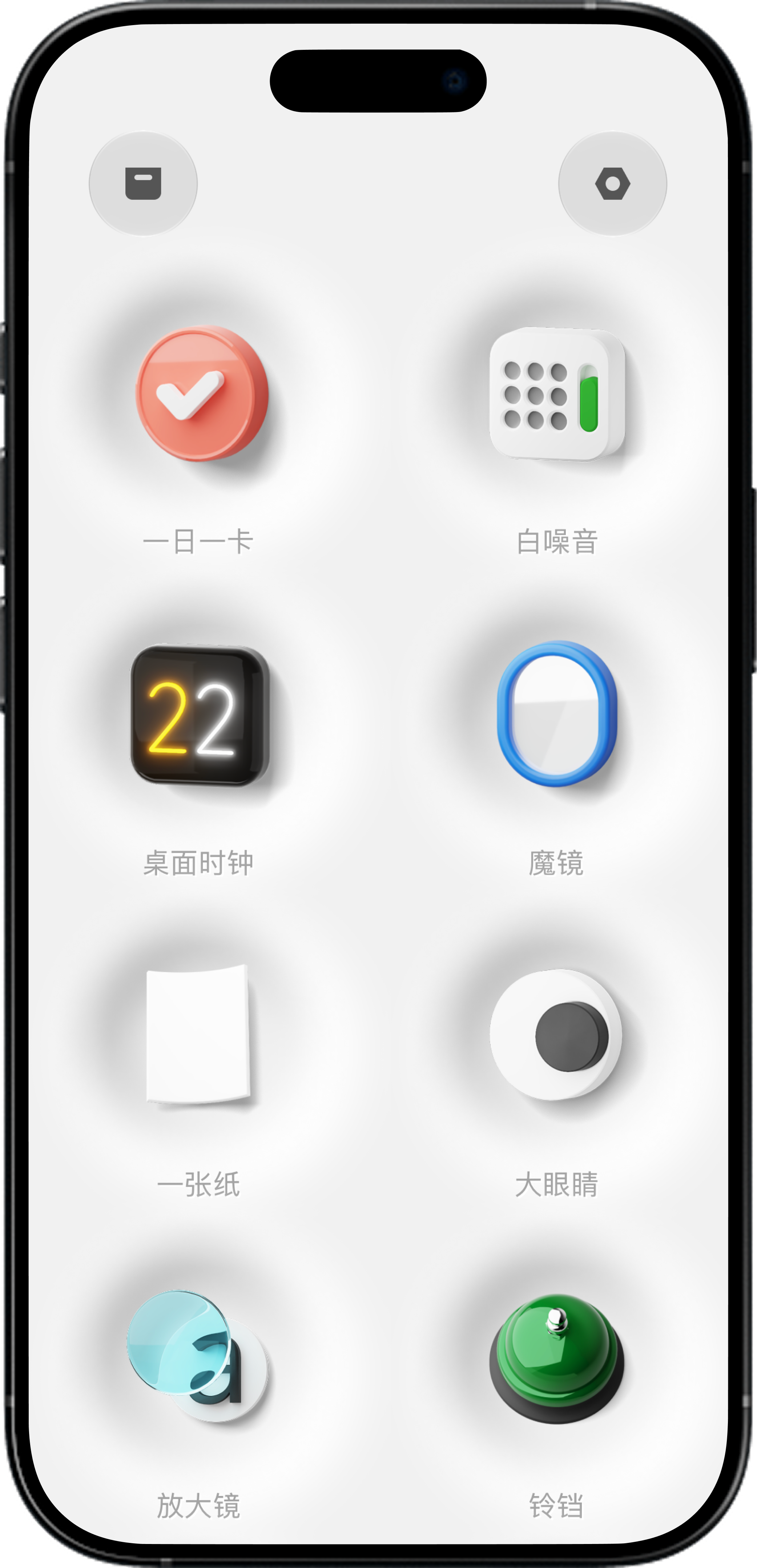
WhatKit 是一款整合了一日一卡、白噪音、桌面时钟、一张纸草稿笔记、放大镜、响铃及饮水提醒等多种日常实用小工具的 iPhone 口袋工具箱 App。 WhatKit is an iPhone pocket toolkit integrating essential daily utilities including One Card productivity, white noise, desktop clock, draft notes, magnifier, call bell, and hydration reminders into a single app.
核心功能列表 Core Features







使用场景:谁会用、什么时候用? Use Cases: Who & When
工作与学习时的任务聚焦 Focus & Task Prioritization
在每天开启工作前,打开「一日一卡」列出次日要做的 6 件事,并把最高优先级的卡片置于桌面小组件或实时活动中,搭配「白噪音」开启沉浸专注。 Before starting your day, use "One Thing" to pick and rank 6 core tasks, pin the #1 priority to Live Activities, and play "White Noise" to achieve deep focus.
临时想法与便签快速捕捉 Quick Idea Capture
电话中需要临时记录地址、或者灵光一现时,打开「一张纸」直接输入,无需经过层层新建文件夹的繁琐操作,随记随存。 When receiving a phone call or catching a quick creative spark, open "Paper" to write notes instantly without managing folders.
书桌与床头氛围摆设 Desk & Bedside Ambient Companion
将旧 iPhone 或正在充电的手机开启「桌面时钟」配合常亮模式,复古辉光文字既能实时查看时间,也是极具质感的书桌摆件。 Turn your phone on a charging stand into a sleek desk clock with "Clock" ambient glow, maintaining screen-on time for clear time checks.
聚会游戏与生活小道具 Party Games & Life Utilities
桌游聚会时用「铃铛」做抢答器;暗光环境拍照或查看小物品时开启「补光灯」与「放大镜」;或者在办公桌放上「大眼睛」增添一份搞怪趣旨。 Use "Call Bell" for tabletop games, light up dark objects with "Light" and "Magnifier", or leave "EYEs" on your desk for fun visual flair.
为什么选择 WhatKit? Why Choose WhatKit?
10-in-1 多能合一,告别应用堆叠 All-in-One Efficiency
无需下载十几个分散的微型工具 App,一个 WhatKit 即可装下便签、白噪音、时钟、放大镜与提醒等日常高频工具,保持主屏幕清爽。 Replace dozens of single-purpose apps with one versatile toolkit. WhatKit packs note-taking, white noise, clock, magnifier, and reminders into a clean single workspace.
极轻体积与零广告负担 Lightweight & Ad-Free Experience
代码架构精简高效,占用内存与系统资源极小;绝无弹窗广告与强制推送干扰,打开即用、用完即走。 Engineered for extreme performance with minimal memory usage and zero ad pop-ups, ensuring instant startup whenever you need a tool.
即开即用与原生深度支持 Instant Access & iOS Native Support
工具无需繁琐初始化设置,支持设置“默认开屏道具”,并深度整合 iOS 桌面小组件(Widgets)、实时活动(Live Activities)与 iCloud 私密同步。 Set your preferred default tool to open directly on launch. Seamlessly integrated with iOS Home Screen Widgets, Live Activities, and private iCloud sync.
常见问题 (FAQ) Frequently Asked Questions
WhatKit(中文名:那什么WhatKit)是一款整合了多种日常实用小工具的 iPhone 口袋工具箱 App。它将一日一卡(艾维·李法则)、白噪音、桌面时钟、大眼睛、一张纸草稿笔记、放大镜、响铃及饮水提醒等功能融为一体,方便随时在单个应用中调用各类日常微小工具。
WhatKit is an all-in-one iPhone pocket toolkit that integrates daily micro-utilities including task cards (Ivy Lee Method), white noise, desktop clock, draft notes, magnifier, call bell, and hydration reminders.
WhatKit 可在 iOS App Store 免费下载体验。用户可以免费使用基础道具与功能;同时应用内提供「Join Plan」订阅机制,供希望解锁更多高级定制性与全部道具拓展的用户进行选择。
WhatKit is free to download on the iOS App Store with core tools available. Additional advanced features and full kit access can be unlocked via the optional Join Plan subscription.
WhatKit 现已上线 10 项真实功能:1. 一日一卡(艾维·李法则任务管理);2. 白噪音(自然音频);3. 桌面时钟(辉光常亮时钟);4. 一张纸(极简便签);5. 大眼睛(手势互动视觉);6. 放大镜(10X放大及补光);7. 铃铛(拟真响铃);8. 下一杯水(科学喝水提醒);9. 补光灯(屏幕柔光);10. 魔镜(励志短语镜面)。
WhatKit currently features 10 tools: 1. One Thing (Ivy Lee task cards); 2. White Noise; 3. Desktop Clock; 4. Paper (minimalist notes); 5. EYEs; 6. Magnifier; 7. Call Bell; 8. Next Cup (water reminders); 9. Light (screen glow); 10. Mirror.
是的。例如「一日一卡」功能支持在 iPhone 主屏幕添加 iOS 桌面小组件(Widgets),并能在灵动岛与锁屏界面开启实时活动(Live Activities),让你无需每次打开应用即可时刻掌控最重要的一件事。
Yes. For instance, "One Thing" supports iOS Home Screen Widgets and Live Activities, displaying your top priority task on your Lock Screen and Dynamic Island.
WhatKit 是综合性的口袋小工具箱,涵盖多门类轻量效率与趣味实用工具;而 miroro 是我们公司专门推出的独立升级版 AI 镜子与情绪觉察 App。如果您主要希望体验更专业的精细美颜镜面、多级补光与 15 秒情绪记录,推荐使用 miroro。
WhatKit is a broad pocket toolkit with diverse daily utilities. miroro is our dedicated standalone app specializing in AI mirroring, smart lighting, and 15-second emotional check-ins. If you seek advanced mirror features, we recommend trying miroro.
开启你的口袋工具箱 Get Your Pocket Toolkit
立即在 App Store 下载 WhatKit,体验随手即用的生活与效率小工具。 Download WhatKit on the App Store to enjoy instant, essential tools on your iPhone.